Thank you.
I’ve opened a PR here https://github.com/Foundry376/Mailspring/pull/2395
I think it would especially benefit from someone else testing it, as I don’t have a testing setup for all the Linux desktop environments
For now, I am replacing the white icons with inverted ones following instructions from Reddit user void_matrix found here: https://www.reddit.com/r/linux4noobs/comments/1f9zkdz/how_to_change_the_mailspring_notification_icon_in/
In may case, it was in /usr/share/mailspring/resources/app.asar/internal_packages/system-tray/assets/linux/
I made a script to automate the whole thing, requires npm and imagemagick to be installed
#!/bin/bash
if type npm convert &> /dev/null; then
sudo npm install -g asar
sudo cp /usr/share/mailspring/resources/app.asar /tmp/
sudo cp -R /usr/share/mailspring/resources/app.asar.unpacked /tmp/
sudo chmod 777 /tmp/app.asar
sudo chmod -R 777 /tmp/app.asar.unpacked
asar extract /tmp/app.asar /tmp/mailspring
convert -negate /tmp/mailspring/internal_packages/system-tray/assets/linux/MenuItem-Inbox-Full.png /tmp/mailspring/internal_packages/system-tray/assets/linux/MenuItem-Inbox-Full.png
convert -negate /tmp/mailspring/internal_packages/system-tray/assets/linux/MenuItem-Inbox-Zero.png /tmp/mailspring/internal_packages/system-tray/assets/linux/MenuItem-Inbox-Zero.png
sudo rm /tmp/app.asar
asar pack /tmp/mailspring /tmp/app.asar
sudo cp /tmp/app.asar /usr/share/mailspring/resources/
else
  echo "This script requires the following packages to run: npm imagemagick"
  type npm &> /dev/null || packages+="npm "
  type convert &> /dev/null || packages+="imagemagick "
  echo "Missing: $packages"
fi
5 years later and dark tray icon beyond our reach?
Hey folks! Mailspring 1.17.4 was released this morning and adds dark/light system tray icon support on Linux (#2602), which automatically adapts the tray icon to match your desktop theme. After many years I think we finally got this sorted 
Please update to 1.17.4 and let us know if the icon now displays correctly on your light-themed desktops. I’d love a few more eyes on this change, because on some distros (eg: Ubuntu), the system tray remains dark in the light theme by default. I’ve verified that case is handled correctly, but we may need to make a few distro-specific tweaks.
I just updated, I’m using Ubuntu 22.04, and the new icons are not working correctly. I suspect that symbolic SVGs might not been used. And they hardcoded the icon that should be used, creating the problem.

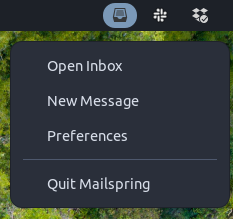
Ahh wow interesting, I looked at Ubuntu 25 but not Ubuntu 22, surprised that they’re behaving differently. Thanks for the quick reply, I’ll get this resolved in the next patch release. I think you’re right that we need to use symbolic SVGs and not try to provide the correct color (black / white) icon to really do this for platforms where the system theme does not change the color of the status bar.
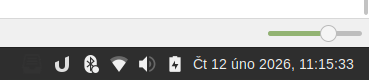
I second that: on Linux Mint 22 Cinnamon with dark panel, the icon is now dark and not visible. It worked for me correctly in previous versions (the icon used to be white):
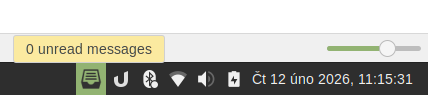
Hey folks - Version 1.18.0 shipped this morning and includes another fix for this. On GNOME/Unity desktops, the app will use the white icon variant, since the bar has a dark background regardless of your system theme (#2610). Sadly it seems like Electron is a bit behind and we can’t use symbolic SVGs / template images on Linux, so we’re stuck using a bunch of logic to determine the correct icon color. If this doesn’t resolve the issue for enough people, we have to go the path a few other apps have and allow you to configure this in the app’s settings.
If you’ve been affected by this, please give 1.18.0 a try — update via snap refresh mailspring, the built-in auto-updater, or from https://www.getmailspring.com/download.
Thank you for the quick turnaround!
On Linux Mint 22 Cinnamon (with Mailspring installed through a .deb package, as Linux Mint discourages using snap) the update did not help - the icon remains dark on dark background.
I am completely fine with configuring it manually, although I wonder whether there could be a way to return to the way it worked before when the icon was visible with no issues.
I confirm that everything new dark/light tray icon works flawlessly with KDE too.
The last update solves it for me (I set the icon to “light” manually). Thank you!
This topic was automatically closed 30 days after the last reply. New replies are no longer allowed.