Description
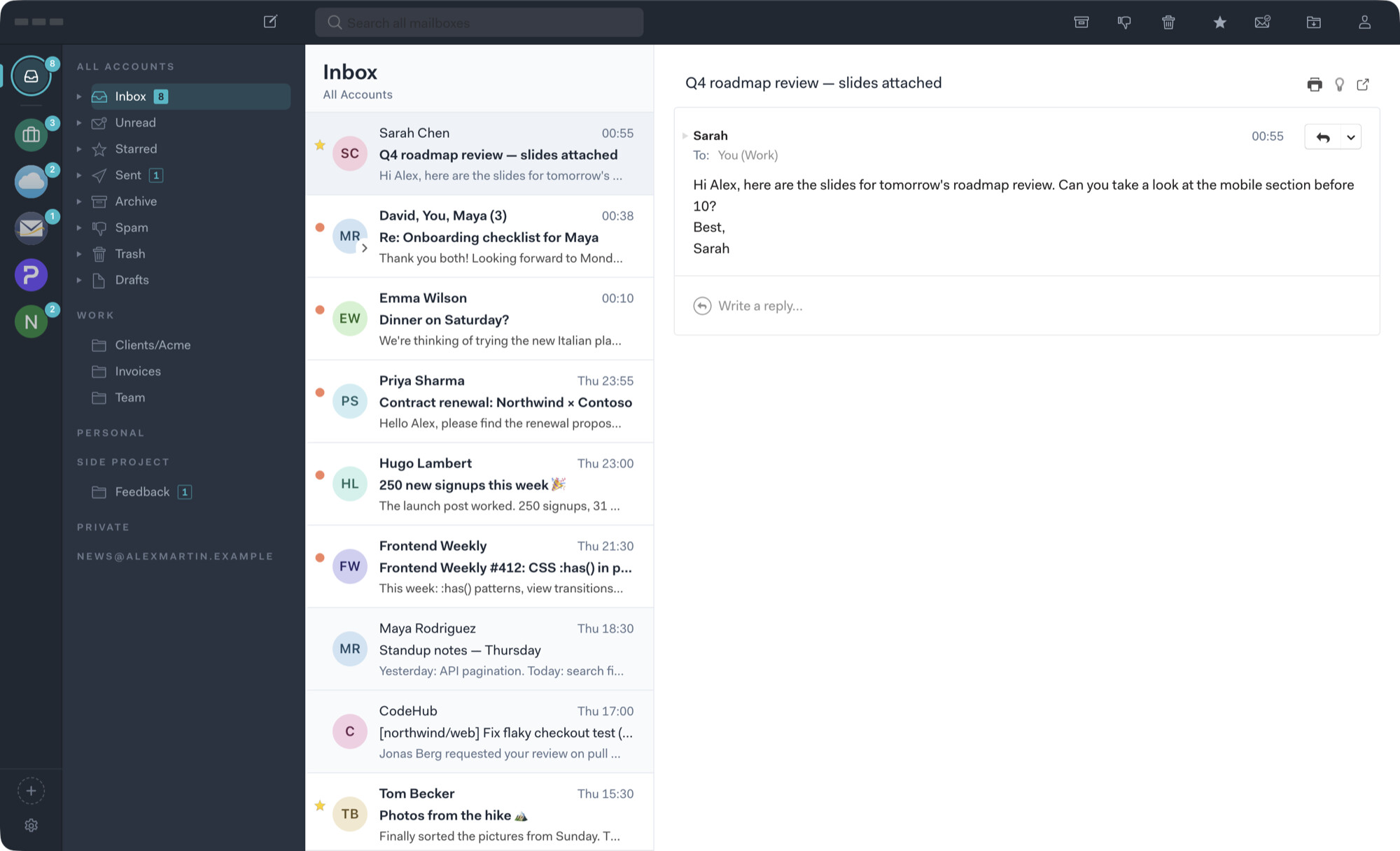
I’ve been using Mailspring daily with several accounts, and I missed the way Airmail lets you jump between accounts with a single click. I also never liked managing all my email accounts and respective folders in the same panel. So I built Modern UI, a plugin that gives Mailspring a cleaner, more modern layout:
[Account rail] [Folders] [Message list] [Reader]
It works with the official Mailspring build: no fork, no recompiling, no changes to the app bundle and no separate theme to install. Everything goes through Mailspring’s plugin APIs (ComponentRegistry, PreferencesUIStore, AppEnv.config…), and removing the plugin brings back the stock interface.
It’s free, open source (MIT), and nothing leaves your machine: no analytics and no remote avatars or logos. Every icon is bundled.
Features
-
Account rail. A slim vertical bar to the left of the folder list, with one icon per account plus an “All Accounts” entry. One click switches account (same as Cmd+1…9), with unread badges and a tooltip showing the label and address.
-
Per-account icons and colors. Pick an icon for each account from 64 Lucide icons and 36 brand logos (Simple Icons), and a background color, with a live preview. Without a custom icon, the rail uses Mailspring’s own provider logo, else the account’s initials.
-
Contact avatars in the message list. Photos stored locally in your address book (CardDAV), otherwise colored initials that stay the same for a given contact. They work in both the split and list layouts, and avatar size can be set.
-
Folder title above the list. “Inbox”, “Sent Mail”, your custom folder names or “Search Results”, with the current account underneath. “Delete” in new-mail notifications replaces “Archive” and moves the message to the right account’s Trash, never a permanent delete. A native “Modern UI” tab in Preferences lets you toggle every feature live: dark toolbar and sidebar, light list colors, 7 accent colors, avatar size, rail options. English and French.
Screenshots
The main window with the account rail, folder title and avatars:
Everything is configurable from Preferences › Modern UI:
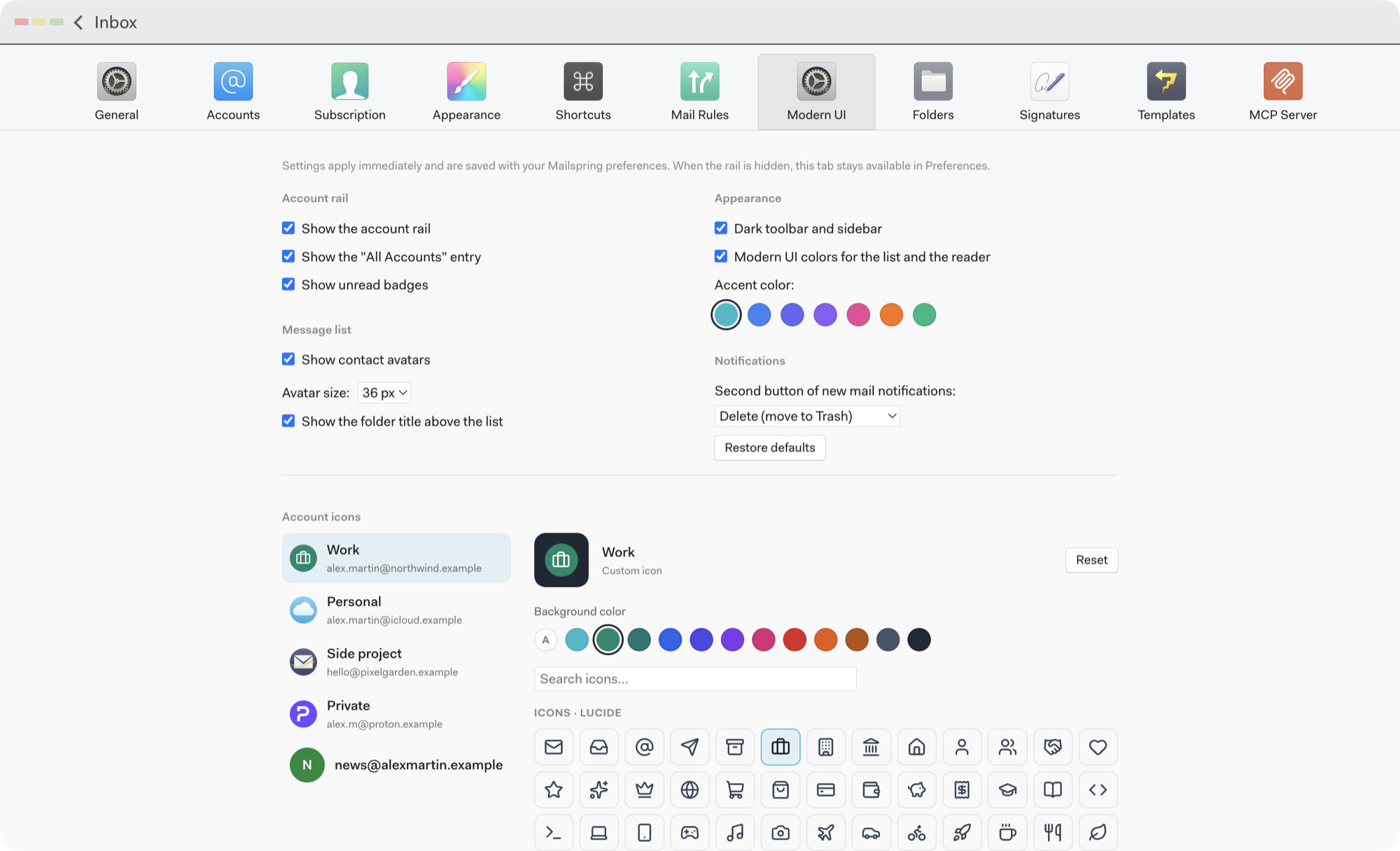
Each account can get its own icon and color:
The screenshots use a demo profile with fictional accounts and messages.
Install
Requires Mailspring 1.26 or later. I built and tested it on macOS with Mailspring 1.26.2. It should work on Windows and Linux too, but I haven’t tested those yet, so feedback is very welcome!
- Download
mailspring-modern-ui-<version>.zipfrom the latest release:
Release Modern UI v1.2.0 · simokhalil/mailspring-modern-ui · GitHub - Unzip it. You get a
mailspring-modern-uifolder. - In Mailspring, open Developer › Install a Plugin… and select that folder.
- Restart Mailspring.
Settings are in Preferences › Modern UI. To uninstall, delete the plugin folder (~/Library/Application Support/Mailspring/packages/mailspring-modern-ui on macOS) and restart.
Good to know: the “Delete” notification button relies on Mailspring’s built-in notifier. If a future Mailspring version changes it, the plugin detects this and keeps the stock “Archive” button instead of breaking anything.
Getting Help
- Bugs and feature requests: please open an issue on GitHub. A screenshot and your Mailspring version and OS help a lot:
Issues · simokhalil/mailspring-modern-ui · GitHub - Questions and ideas: reply to this thread, I’ll be following it as much as I can.
- Source code and docs: GitHub - simokhalil/mailspring-modern-ui · GitHub. The README covers every setting, and
docs/compatibility.mdlists exactly which Mailspring APIs the plugin uses.
Contributions are welcome! And thanks to the Mailspring team for the plugin starter and a great app to build on.