Description
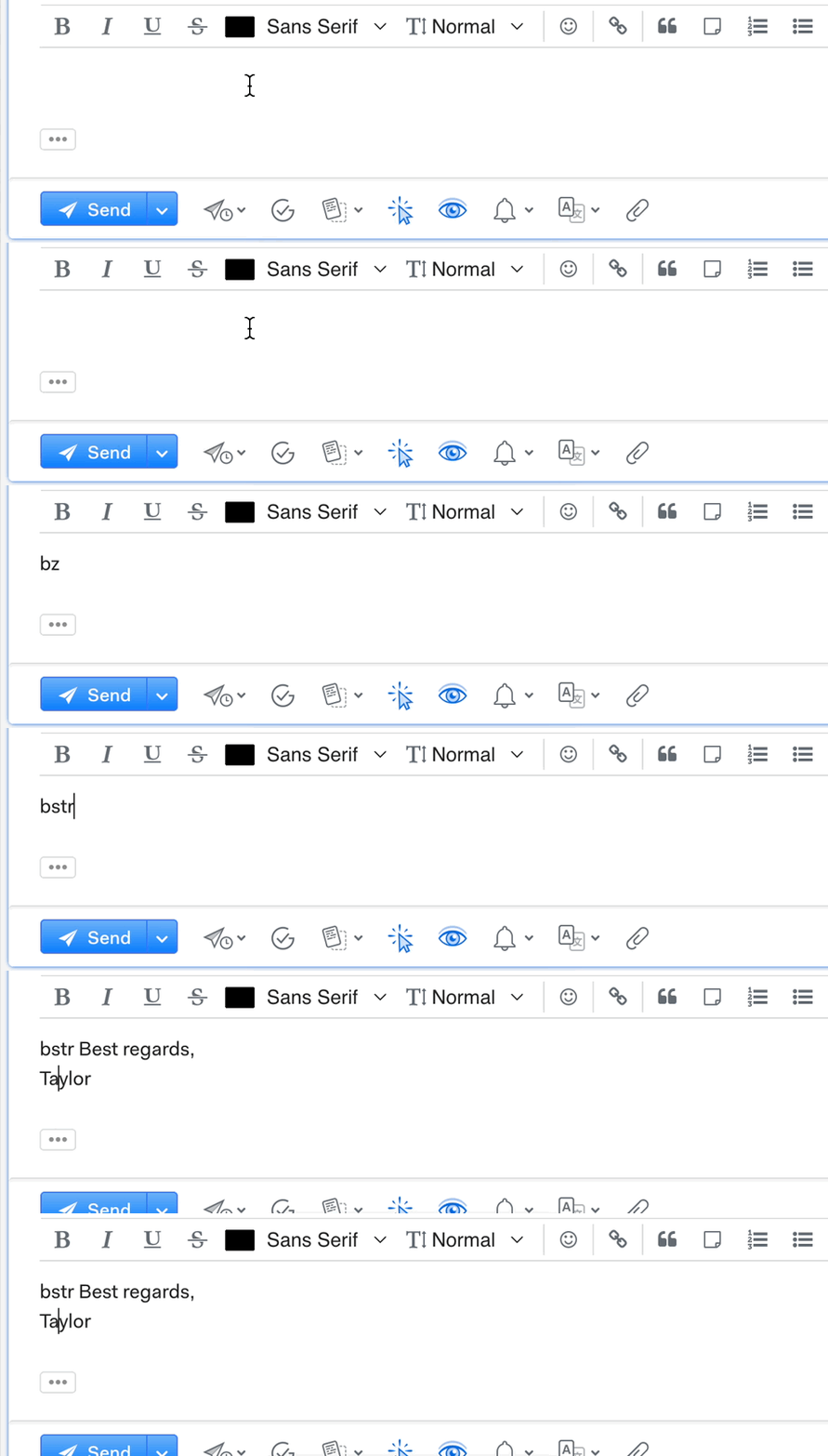
When a macOS Text Replacement (System Settings > Keyboard > Text Replacement) is triggered in the Mailspring composer, the replacement text is inserted, but the original shortcut text also remains in the message body. The shortcut should be removed and replaced.
To Reproduce…
Steps to reproduce the behavior:
-
On macOS, open System Settings > Keyboard > Text Replacement and add an entry (shortcut: bstr, replacement: Best regards, Taylor).
-
In Mailspring, open a new message (Compose)
-
In the message body, type the shortcut and press Space (or Return)
-
The replacement text is inserted, but the typed shortcut remains next to it.
Expected Behavior
The typed shortcut is replaced by the replacement text, as it is in other macOS apps. Only the replacement text should remain in the message body.
Screenshots
Setup
- OS and Version: macOS 15.2
- Installation Method: Downloaded ZIP
- Mailspring Version: 1.26.0
Additional Context
This issue is not new. It also occurred in earlier Mailspring versions. The animated GIF above shows the shortcut remaining in the message body after the replacement text is inserted.