Description
When attaching multiple files at once to an email, the files are reordered into an apparently random order.
To Reproduce…
Steps to reproduce the behavior:
- Select multiple files in File Explorer,
- Drag onto compose window to attach to email (EDIT: after testing, this also happens if attaching by clicking the attachment button and selecting multiple files),
- Note the order is different from what was in File Explorer.
Expected Behavior
Files attach in the same order they had appeared in File Explorer. This happens on most other email programs I have used, as well as Gmail’s web interface.
Screenshots
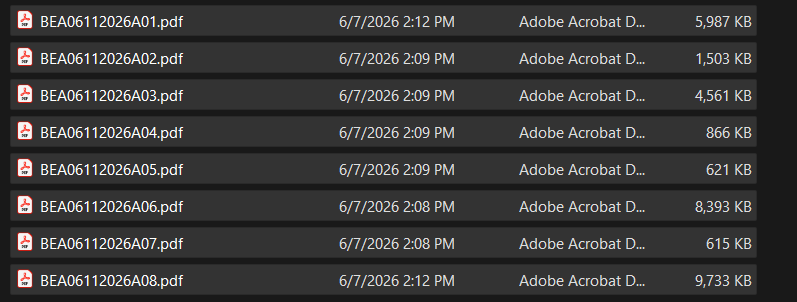
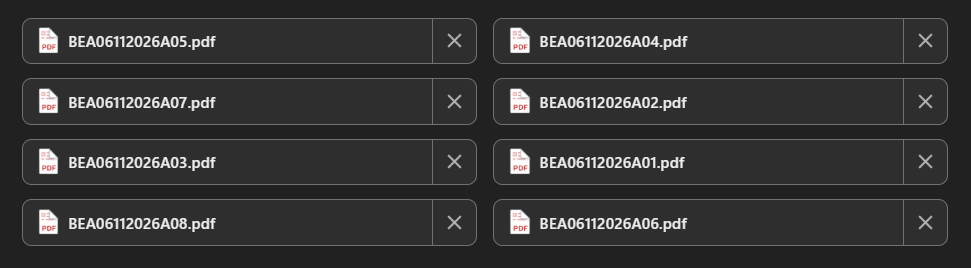
Setup
- OS and Version: Windows 11
- Mailspring Version: 1.22.0-b29ea0e6
Additional Context
This isn’t a new issue, it’s been around for quite a while, I just finally decided to make a post about it. I initially thought it was ordering them from smallest to largest, but that doesn’t seem to be the case, as can be seen with sizes for file ending in 04 vs file ending in 07. I do pagination work, and when sending proofs I like them to go in order so the recipient can more easily see them in order. Mailspring is the first email app where I have to add them individually, one at a time, instead of draging and dropping the entire file list. When dragging the files over, I am selecting the first file in the list. I know sometimes that can cause ordering issues if clicking and dragging from, say, the center of the list.