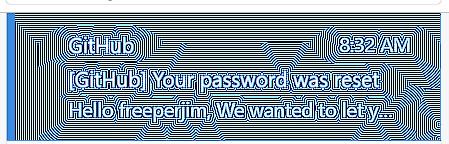
New user here and enjoy many aspects of mailspring.
However, the color pixelation distortion is quite offputting & abrasive. I’ve attempted may “fixes” but none work. Any help will be appreciated.
New user here and enjoy many aspects of mailspring.
However, the color pixelation distortion is quite offputting & abrasive. I’ve attempted may “fixes” but none work. Any help will be appreciated.
Can you explain what color pixelation distortion you are talking about?
Maybe share a screenshot?
Thank you for the reply.
“Color pixelation and distortion appear as ever changing blocky, chunky, or discolored artifacts in a digital image, text or video.”
In Mailspring, the distortion occurs in photos & texts including the email that is selected & highlighted in blue. The color changes from solid to an alternating blue & white. Mailspring is my only app that siffers from this distortion.
Another concern is “Contacts” and how it often fails to find the contact in my Hotmail/Outlook account.
Ditto the lack of choosing Font size - i.e. 10, 12, 14, etc - and limited font styles
But the color pixelation distortion is quite visually abrasive and a more serious concern at the moment.
Not sure why you are having that issue. Did you try changing the theme?
Did you see anyone else having the same issue?
Tried all the themes - no change.
Tried different graphic settings for Mailspring app - no change.
Mailspring could be a nice email client but misses on so many basic attributes.
Quick question re: tracking - are the “opening times” based on user’s time zone or recipient’s?
Dark mode CSS improvements were included in v1.21.1 (released May 19, 2026) — please update and see if the rendering artifacts improve.
If they persist, these kinds of artifacts are sometimes GPU-related. Try launching with --disable-gpu to rule out GPU acceleration as the cause. On Windows: right-click your Mailspring shortcut > Properties and add --disable-gpu to the Target field.
Could you also share your OS and display setup (resolution, HiDPI/scaling)? That will help narrow it down.
Apology for late reply…
“Dark Mode” still has pixelation distortion as do all themes.
Windows11 on ASUS Zenbook laptop.
I’ve not tried adding --disable-gpu but I’ll give it a try.
Thank you for your assistance.