The sound when receiving new mail is very loud. I have “System Sounds” in GNOME set very low. Is there a setting in Mailspring that I’m failing to notice?
1 Like
Unfortunately, no, I don’t believe so. 
There is a (non-trivial) workaround for overriding the sound here: Custom notification sound - #2 by githrdw
I’d recommend creating a feature request for this, or else voting for the preceding feature request.
Reposting this from Add a receive sound that is selectable for incoming email - #2 by ChocoTonic
This request is addressed by Mailspring PR #2830.
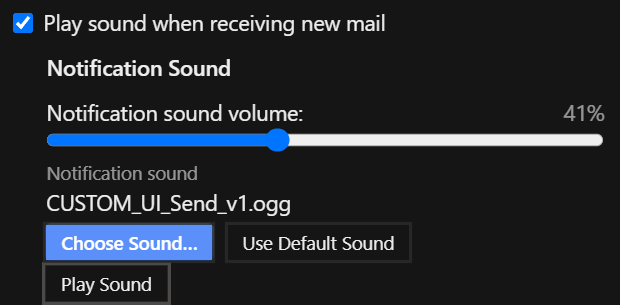
The pull request adds:
- A user-selectable notification sound.
- Notification sound volume control.
- A preview button that plays the currently selected sound.
- A button to restore the default notification sound.
- A file picker that opens at the current sound or bundled default sound location.
The notification sound controls have also been grouped so changing the sound and restoring the default are together, while previewing the selected sound is a separate action.
Please review or test the implementation on the pull request and leave technical feedback there.