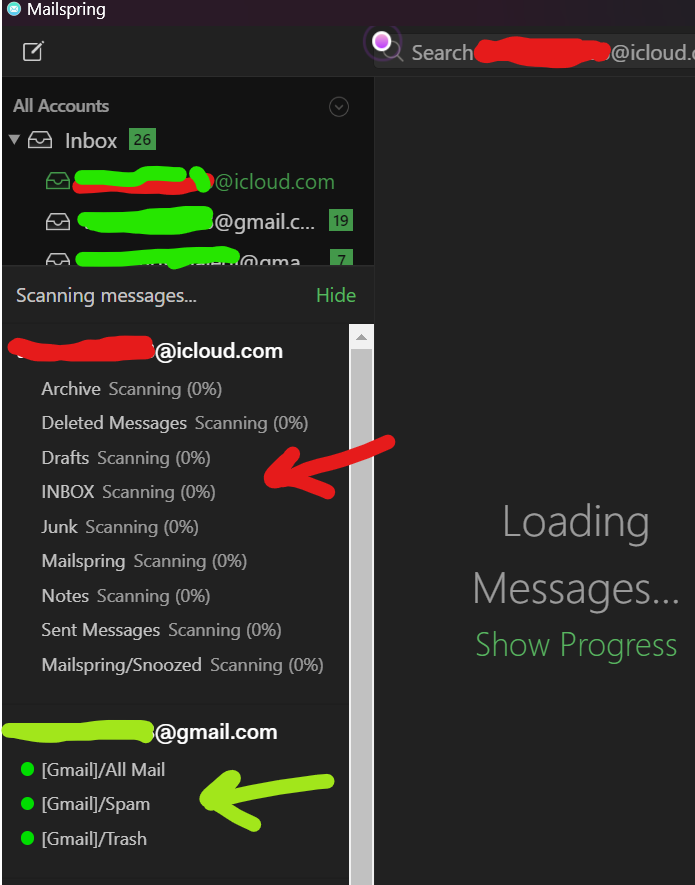
Facing problem with my icloud account sync stuck at 0 %. but other gmails accounts are working fine. Iam on windows 11 , app version 1.13.9. Earlier it used to work fine.
i tried rebuilding cache
reinstalling application
installing ealier version of mailspring
tried adding both icloud account and imap/smtp account
-iam using app specific password.
None of these solution worked for me.
iCloud was the one provider where this happened reliably, and it took me embarrassingly long to pin down: iCloud’s IMAP server has some non-standard behavior (it sends malformed responses for deleted messages and can return invalid sequence numbers when you ask for a range), and the sync engine would hit that during the initial scan, bail out, and start the folder over — which is exactly what “0% for hours, but new mail still arrives” looks like. Rebuilding the cache or reinstalling didn’t help because the fresh scan hit the same thing.
That’s fixed in 1.17: 1.17.0 shipped a rework of the sync engine that cured the iCloud “infinite sync”, and 1.17.2 switched iCloud accounts to a more conservative sync mode that avoids the broken server extension entirely. If you’re still on a 2024 build, update to the current 1.24.x release, then select the iCloud account in Preferences > Accounts and click Rebuild Cache… once so the folders are scanned fresh with the new engine. It should walk through the whole mailbox this time; Why don’t I see all my old mail? — Mailspring Documentation explains what the progress panel is telling you along the way.