Description
UI text elements in Russian displayed with plain text font are rendered in a font different from other strings in English and from bolt text. This affects both folder list and messages.
To Reproduce…
Steps to reproduce the behavior:
-
Start Mailspring
-
Switch interface language to Russian or send/recieve message in Russian
Expected Behavior
Font used for UI is the same regarding of language
Screenshots
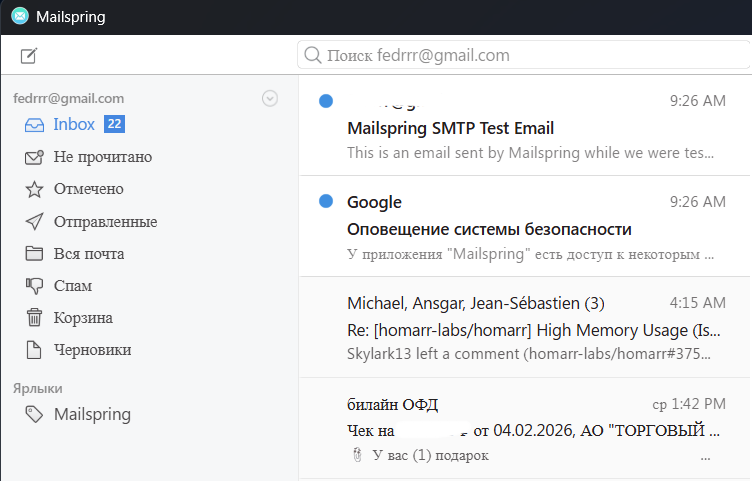
- folder Inbox is in English and is displayed properly,
- other folders are in Russian and use different font,
- first message in the list is in English and is displayed properly,
- second message is unread and has topic in Russian - displayed properly,
- last message is read and in Russian - uses different font.
Setup
OS and Version: Windows 11 25H2
Installation Method: Winget (downloading from Github)
Mailspring Version: 1.17.3
Additional Context
That behavior is happening only on one of my Windows PCs, others are working fine. I couldn`t find a difference in their setups, that would bring font to normal.
Probably would not be a problem if Choose plain text font is implemented.