I have the free version of Mailspring (v. 1.11.0-6193b33c). The problem is that as I add more than 3 email accounts, I don’t get a full list of folder options.
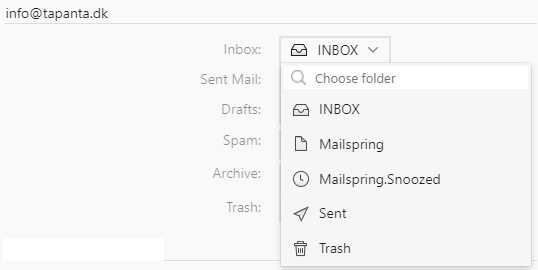
First a sceenshot of a full dropdown list for email account #1 (this list is identical for email account #2 & #3 as well)
Especially note the “Sent” & “Trash” folders.
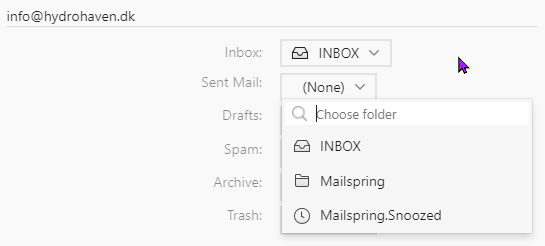
Here is the same screenshot but for email account #5 :
The “Sent” & “Trash” folders are missing (which result in me not being able to sent email from this account, however I can receive email on the account)
I wonder if it is because I use the free version or if it is a bug or most likely me who don’t understand correctly how to setup folders?
It’s not the free version — there’s no account limit at all, and the folder mapping works the same for every account. The dropdowns in Preferences > Folders only ever list folders that the mail server reported for that specific account, so if “Sent” and “Trash” aren’t in the list for account #5, that account’s server isn’t presenting folders by those names.
Two usual explanations:
The account hasn’t finished its first sync. The Folders tab hides an account’s rows until its folder list has been downloaded, and a partial list can mean it’s still in progress or hit an error. Check Preferences > Accounts — if the account is shown in red, the Error Details… button says why.
The provider names them differently. Many servers use “Sent Items” / “Deleted Items” / “Sent Messages” or nest them under INBOX, and Mailspring’s automatic detection occasionally misses those. In that case the right folders are further down in the dropdown; pick them and the account will start sending (it needs a Sent folder to file copies into). If the server has no Sent/Trash folder at all, create them in the provider’s webmail, then select the account in Preferences > Accounts and click Rebuild Cache… so Mailspring reloads the folder list.