Running npm run test on macOS launches Electron and begins initialization but then presents a modal error dialog related to the local email database. The test process does not proceed past this point.
This occurs even when Mailspring has never been run before on the system and after confirming no related processes are running.
To Reproduce…
Steps to reproduce the behavior:
- Clone the Mailspring repository
- Ensure Node v20.20.0 is active via nvm
- From the repository root, run
npm install - Run
npm run test - Electron launches and prints
Running database migrations - A modal dialog appears reporting a local email database error
Expected Behavior
npm run test should complete test initialization without presenting a database error dialog.
Screenshots
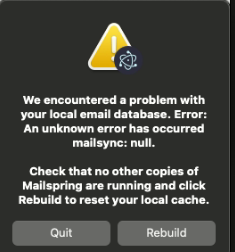
A modal dialog appears with the following message:
We encountered a problem with your local email database. Error:
An unknown error has occurred
mailsync: null.

Check that no other copies of Mailspring are running and click Rebuild to reset your local cache.
Clicking rebuild closes then reopens the modal and quit ends the process.
Setup
OS and Version:
macOS (Apple Silicon Mac mini)
Installation Method:
Source build from GitHub repository
Mailspring Version:
Source build
Node and npm:
- Node v20.20.0
- npm 10.8.2
nvm Version:
0.40.3
Active Node Versions (via nvm list):
->     v20.20.0
       v16.20.2
Additional Context
Command output when running tests:
npm run test

> mailspring-root@0.0.1 test
> electron ./app --enable-logging --test

Running database migrations
After this output, the database error dialog appears and test execution does not continue.
The issue occurs even though Mailspring has not been previously run on this machine. Activity Monitor was used to confirm no running instances of Mailspring or mailsync prior to running the test.