Description
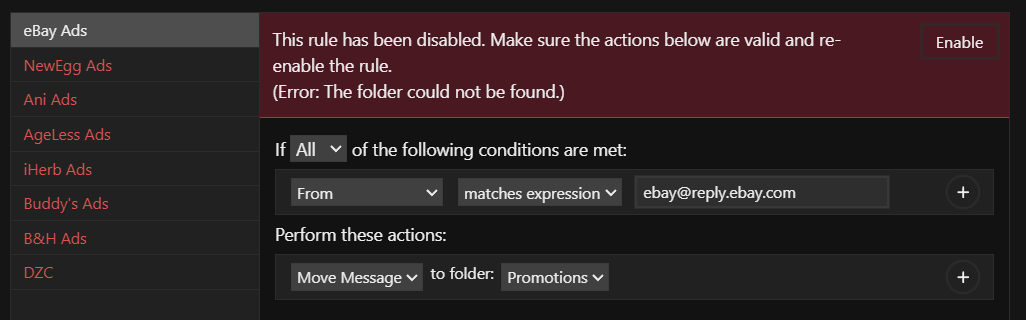
Pressing the ‘Process entire inbox’ button to apply rules fails and disables all rules - marking them all red - with the error: "The rule has been disabled. Make sure the actions below are valid and re-enable the rule. (Error: The folder could not be found.)
Ignoring the errors and clicking the ‘Process entire inbox’ button again, (with every rule still disabled and marked red) begins to process all emails, as though there are active rules to apply.
So two bugs:
- Rules are disabled by ‘no folder found,’ even though they exist and were selected from a drop down list.
- Inbox processing proceeds, even if there are no active rules to apply.
To Reproduce…
Steps to reproduce the behavior:
- Add a new "Label"
- Create a rule to filter by sender, and move all messages to "folder." (is it a label or a folder? seems like a folder.)
- Click the "Process entire inbox" button.
- After errors appear. Click the button again to trigger a zero-effect scan of the inbox.
Expected Behavior
No valid rule should be marked as invalid. The inbox should be processed to apply those rules. And if all rules are invalid, clicking the process button should not actually scan the inbox.Screenshots
Setup
- OS and Version: Windows 10.0.19045
- Installation Method: MailspringSetup.exe
- Mailspring Version: 1.22.0-b29ea0e6
Additional Context
Brand new installation. Doing a first time setup. Using IMAP. (no oAuth) After import, inbox contains 30,000+ emails.