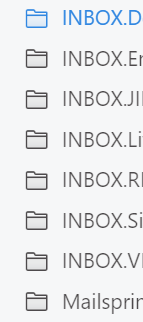
I’ve added a cPanel-based IMAP account to my MailSpring client. This is connected without issue, however, I see that MailSpring is displaying the Prefix within my folders, so they’re all based on “INBOX”.
Is there any way to define this “Prefix” in the settings for that account, so that these folders don’t display as INBOX.WHATEVER?
This is a common option in most email clients but was unable to find the relevant setting or anything useful via Google.
There’s no prefix setting because Mailspring is meant to handle this automatically: it reads the server’s NAMESPACE response, stores folders under their full path (INBOX.Work), and hides the INBOX. part in the sidebar and folder pickers, so a cPanel/Dovecot account should show Work, Archive, etc. as top-level folders rather than INBOX.Work. Creating folders and moving mail also apply the prefix automatically.
If you’re on a current build (1.24.x) and still see INBOX.Something in the sidebar, I’d like to know the exact folder path as shown in Preferences > Folders and which delimiter the server uses (. vs /) — that would mean the server is reporting a namespace shape I’m not accounting for.