Description
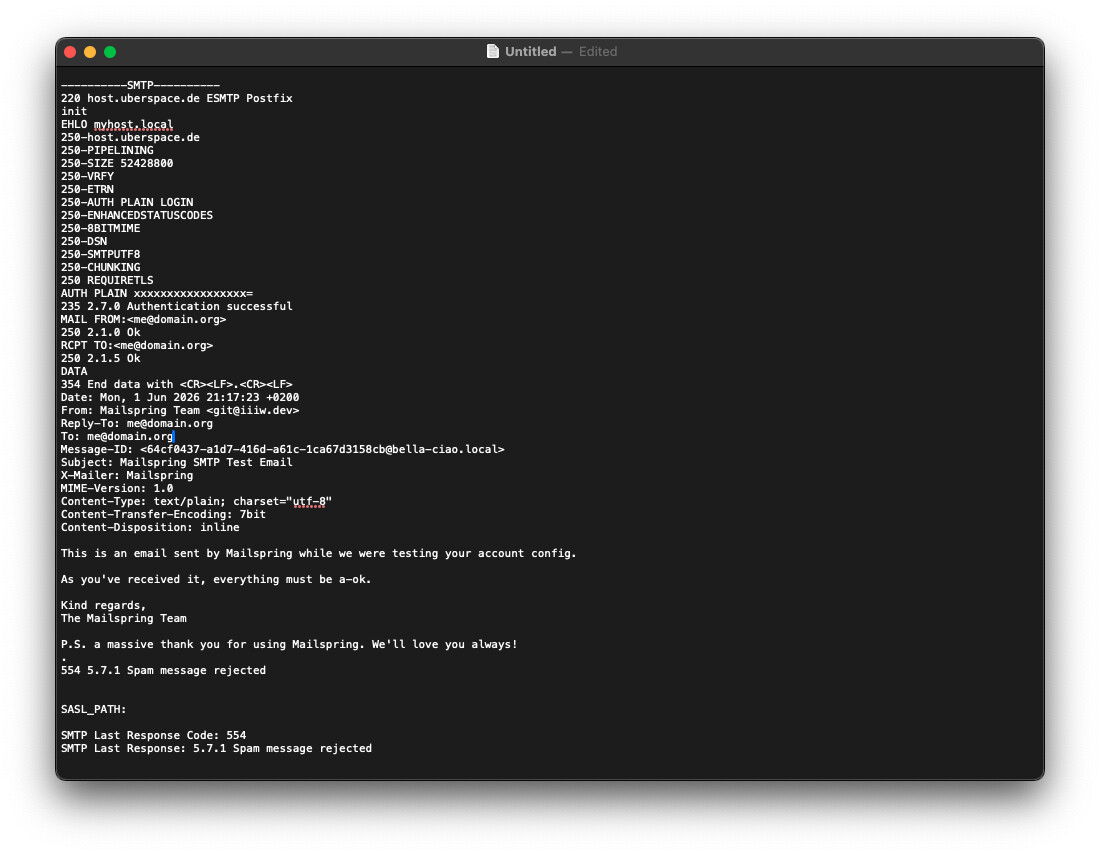
I cannot set up email accounts because Mailspring’s SMTP test email is being rejected as spam. SMTP response code: “554 5.7.1 Spam message rejected”
To Reproduce…
Steps to reproduce the behavior:
-
Add an Account. Select “IMAP/SMTP” in the “Connect an email account” dialogue. Fill in Name, Email, Password in the “Add your IMAP account” dialogue. Continue.
-
Fill in IMAP and SMTP details and click “Connect Account”.
-
Follow the “View Log” link of the resulting error message and check the last lines.
Expected Behavior
The account is being set up.
Screenshots
This is the SMTP related part of the log (redacted). The authentication step is completed successfully. The rejected Mailspring SMTP test email and the error response are displayed.
Setup
- OS and Version: macOS Sonoma 14.8.5
- Installation Method: Homebrew
- Mailspring Version: 1.21.1
Additional Context
The provider has given feedback and reported that Rspamd classified the email as spam, failing at: REPLYTO_EQ_TO_ADDR(5.00){}
If the Reply-To header were disabled in the test email, that might actually help.