Description
I manage a bunch of domain mailboxes and kept getting the usual garbage — messages spoofed to look like they came from my own domain, “I recorded you, send bitcoin” extortion, fake invoices, and brand phishing. I wanted one clear answer in the message itself: is this actually who it claims to be, and why should I trust it? I couldn’t find exactly that, so I built it.
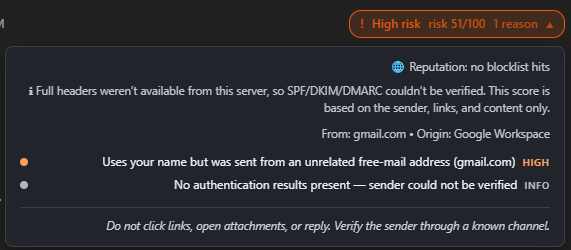
Spoof Guard adds a badge to every message that scores it 0–100 for spoof / phishing / scam / spam risk and, when you click it, lists the exact reasons it was flagged. It’s advisory by default — it never deletes or rewrites mail — with an optional auto-move-to-Spam you can switch on. A fully authenticated, aligned message gets the benefit of the doubt, so real newsletters and receipts stay green; low false positives was the whole point.
 Partial credit: while searching for something like this I found mailspring-auth-results by [their forum @handlehandle] ( GitHub - EmaX093/Mailspring-auth-results · GitHub ). Seeing it surface SPF/DKIM/DMARC right in the message view was the nudge that told me this was even possible in a plugin. Most of Spoof Guard grew out of my own wishlist, but credit where it’s due — thanks for the spark.
Features
Authentication & alignment — SPF / DKIM / DMARC pass-fail-softfail, and whether the domain that actually authenticated matches the visible From:.
-
Spoofing of your own domain — looks like you, but didn’t authenticate as you.
-
Impersonation — someone using your name from an unrelated free-mail account (e.g.
"Jane Smith" <random@gmail.com>), brand impersonation, look-alike / typo-squat domains, and homoglyph (Unicode look-alike) tricks. -
Header tricks —
Reply-To/Return-Pathmismatches and BEC (corporate-looking sender, replies go to Gmail). -
Content & links — sextortion / crypto-ransom language, credential-phishing, fake invoices, links whose text lies about their destination, raw-IP / punycode / obfuscated URLs, shorteners, and QR-code phishing (quishing).
-
Attachments — dangerous types and deceptive double extensions (
invoice.pdf.exe). -
Allow-list & block-list — never-flag senders, and always-spam senders.
-
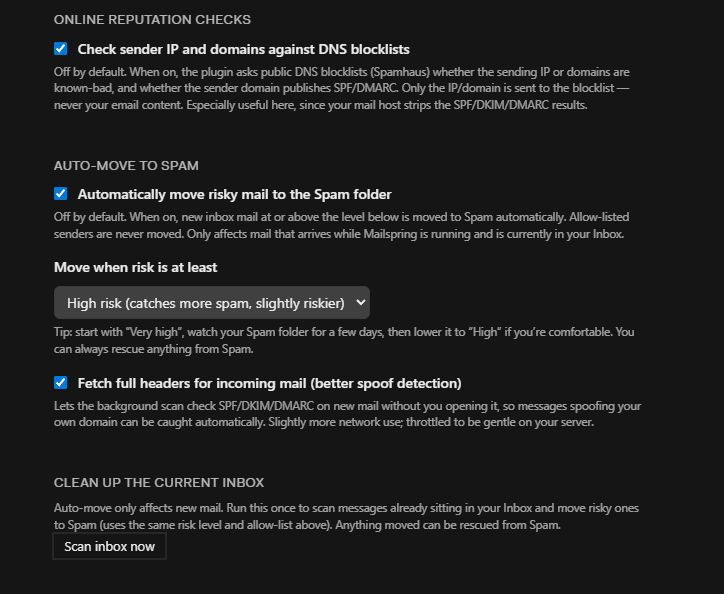
Optional online reputation (off by default) — checks the sending IP and domains against Spamhaus DNS blocklists and whether the sender publishes SPF/DMARC. Only the IP/domain is sent — never your email content.
-
Optional auto-move to Spam — moves new high-risk inbox mail automatically (your chosen threshold), plus a “Scan inbox now” button for what’s already in your inbox. Allow-listed senders are never moved, and anything can be rescued from Spam.
Screenshots
A message flagged High risk, with the reasons spelled out:
Settings — online reputation, auto-move to Spam, and one-time inbox cleanup:
More screenshots on github repo!
Install
No build step — it ships as plain JavaScript.
Code → Download ZIP, then unzip) — or git clone.
- Copy the
mailspring-spoof-guardfolder into Mailspring’s packages directory:- Windows:
%APPDATA%\Mailspring\packages\ - macOS:
~/Library/Application Support/Mailspring/packages/ - Linux:
~/.config/Mailspring/packages/
- Windows:
- Restart Mailspring (or Developer → Reload).
- Configure under Preferences → Spoof Guard.
A quick note on auth headers: SPF/DKIM/DMARC are read from the Authentication-Results header your receiving server adds. If your host strips or rewrites it, those checks may show none — the content/impersonation heuristics still work, and the optional reputation checks help fill the gap.
Getting Help
Source, full docs, and a test suite are on GitHub (MIT licensed):
Bug reports and feature requests: please open an issue on the repo. Feedback and PRs welcome — and if you ever hit a false positive, the allow-list is your friend while I keep tuning the weights. Cheers!