I have been using Mailspring for a few months on Ubuntu. This morning when I tried to open Mailspring it failed to open. I checked the latest revision on snap and it seems to have auto updated last night.
I have since uninstalled the snap (wish I used the revert function before uninstalling) and tried to install with .deb package from the website. Same failure.
It literally just doesn’t load. After un-installation, when I install again, I get the greeting screen and I can add my account. But the moment the “Inbox” has to load, there is just nothing on screen
Screenshots
~ mailspring
Running database migrations
App load time: 211ms
{"error":null}
Manual update check (updates.getmailspring.com/check/linux/x64/1.17.0-5e478521/9f2b7ac6-cf6c-4cbc-bad5-ccce3c8ef6bd/stable) returned 204
(node:24411) [DEP0180] DeprecationWarning: fs.Stats constructor is deprecated.
(Use `mailspring --trace-deprecation ...` to show where the warning was created)
Similar problem with version 1.17.2-a312df89, in Ubuntu 25.10 using snap.
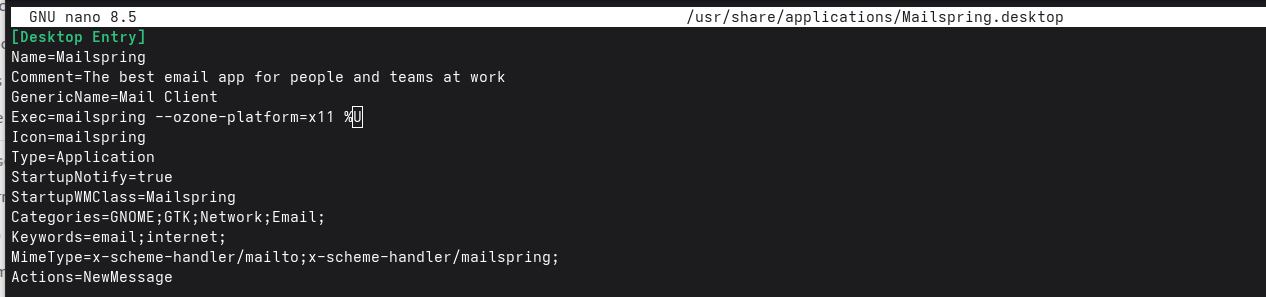
The workaround also works with this version.
This is the output in a terminal:
Normal
$ mailspring
Gtk-Message: 19:04:17.538: Not loading module "atk-bridge": The functionality is provided by GTK natively. Please try to not load it.
Running database migrations
App load time: 756ms

{"error":null}
(node:141722) [DEP0180] DeprecationWarning: fs.Stats constructor is deprecated.
(Use `mailspring --trace-deprecation ...` to show where the warning was created)
(node:142328) [DEP0180] DeprecationWarning: fs.Stats constructor is deprecated.
(Use `exe --trace-deprecation ...` to show where the warning was created)
(node:142334) [DEP0180] DeprecationWarning: fs.Stats constructor is deprecated.
(Use `exe --trace-deprecation ...` to show where the warning was created)
The main window (Inbox) is not shown.
Forcing X11
$ mailspring --ozone-platform=x11
Gtk-Message: 18:58:32.997: Not loading module "atk-bridge": The functionality is provided by GTK natively. Please try to not load it.
Running database migrations
App load time: 401ms

{"error":null}
(node:41701) [DEP0180] DeprecationWarning: fs.Stats constructor is deprecated.
(Use `mailspring --trace-deprecation ...` to show where the warning was created)
(node:42115) [DEP0180] DeprecationWarning: fs.Stats constructor is deprecated.
(Use `exe --trace-deprecation ...` to show where the warning was created)
(node:42122) [DEP0180] DeprecationWarning: fs.Stats constructor is deprecated.
(Use `exe --trace-deprecation ...` to show where the warning was created)
[41988:0130/185836.546187:ERROR:ui/gl/gl_surface_presentation_helper.cc:260] GetVSyncParametersIfAvailable() failed for 1 times!
[41988:0130/185836.556539:ERROR:ui/gl/gl_surface_presentation_helper.cc:260] GetVSyncParametersIfAvailable() failed for 2 times!
The main window (Inbox) is open. Everything seems to works well.
It was working in “normal” mode until upgrade to the last version. Please fix it.
Hey folks - Mailspring 1.17.4 has just been released with a Wayland window activation fix (#2599) that should resolve the blank screen / invisible window issue that many of you have been working around with --ozone-platform=x11. Please update to 1.17.4 and let us know if the app now launches correctly on Wayland without the flag.
I have the same problem with “main” after closing mailspring. The process remains in memory and after more or less one minute it starting sucking up cpu.