Today’s update breaks SMTP AUTH after STARTTLS (IMAP works)

Today’s update 1/24/2025, is not able to authenticate via IMAP

Description

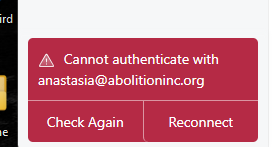
MailSpring is not enabling SMTP authentication, even though the UI shows username/password filled in.

To Reproduce…

Steps to reproduce the behavior:

  1. Update MailSpring to the latest version released Jan 24, 2026.

    Configure an email account hosted on SiteGround (Dovecot).

  2. IMAP settings:
    Server: mail.abolitioninc.org
    Port: 993
    SSL/TLS
    Username: full email address

  3. SMTP settings:
    Server: mail.abolitioninc.org
    Port: 587
    STARTTLS
    Authentication enabled
    Username/password provided

  4. Complete setup.

Expected Behavior

SMTP AUTH is issued after STARTTLS.
Outbound mail sends successfully.

Screenshots

MailSpring completes STARTTLS but never issues SMTP AUTH.
Server advertises AUTH LOGIN PLAIN.
Send fails with mailsmtp Last Error Code: 296 (Unknown).

screenshots to help explain your problem. →

Setup

Windows 11, Mailspring Version 1.17.2-a312df89, paid account

  • OS and Version:
    • Installation Method:
  • Mailspring Version:

Additional Context

IMAP login succeeds.
Same credentials work in Thunderbird immediately.
Issue began after today’s MailSpring update.
Rolling credentials or server changes do not resolve.

Update: Rolling back to the previous MailSpring version immediately restores SMTP AUTH and outbound mail across all affected accounts. Confirms this is a regression introduced in 1.17.2, not a server or credential issue. Auto-updates disabled pending fix.

3 Likes

Oh for the love of… Yup, having the same issue. Out of the frying pan and into the fire!

1 Like

I have the same issue, Mailjet SMTP. Tried all the options (SSL, STARTTLS, different ports).

On Windows, if you uninstall the app and then install 1.16.0 from GitHub, the account remains, and you regain the ability to send mail.

Same here on Ubuntu. SMTP AUTH is broken with 1.17.2 . Rollback to 1.17.1 fixes it.

I hoped this update would fix the bug that the window doesn’t open on Wayland, but that also doesn’t work. SMTP Auth is kind of the basic things a mail client should do, why wasn’t this tested?

How do you disable autoupdate in Mailspring?

1 Like

I didn’t find a way to disable the annoying auto-update. At the moment, I just avoid closing Mailspring and keep the setup for the previous version nearby

The same for me, can’t work anymore :frowning:

How can I downgrade to the oldest version ? (for Windows 11)

If I uninstall the actual version, will I loose all my e-mails ? Do I need to export them before uninstall ?

Download the 1.16.0 setup from GitHub, run it and do not close Mailspring to avoid auto-update. No need to uninstall the current version. No data will be lost

It works, many thanks I can go back to my business !

For me, Mailspring checks and downloads the update, but it does not install unless I explicitly click “Restart and Update.” I just dismiss the prompt. I’ve quit and relaunched multiple times and it stays on the rolled-back version.

So I haven’t disabled updates — I’m just refusing the install step.

Same problem here but I don’t think it’s specific to STARTTLS – if I go into connection settings I get the same error trying to “Connect Account” regardless of whether I’m using STARTTLS or SSL/TLS (my SMTP provider offers both on different ports). The mailspring logs at this point don’t really indicate what it is doing or what went wrong:

----------SMTP----------
220 cmr-tmc.i-09cb16b117244b5cf - SMTP Ready
OpenSSL version: OpenSSL 3.6.0 1 Oct 2025
init
EHLO peacock
250-cmr-tmc.i-09cb16b117244b5cf Hello [REDACTED]
250-SIZE 83886080
250-8BITMIME
250-DSN
250-PIPELINING
250-PIPECONNECT
250-AUTH LOGIN PLAIN
250-CHUNKING
250-STARTTLS
250-SMTPUTF8
250 HELP


SASL_PATH: 

SMTP Last Response Code: 250
SMTP Last Response: cmr-tmc.i-09cb16b117244b5cf Hello [REDACTED]
SIZE 83886080
8BITMIME
DSN
PIPELINING
PIPECONNECT
AUTH LOGIN PLAIN
CHUNKING
STARTTLS
SMTPUTF8
HELP


mailsmtp Last Error Code: 296
mailsmtp Last Error Explanation: Unknown
mailsmtp Last Error Location: 10
mailsmtp Last Auth Type: 2

I can replay this SMTP conversation manually using openssl s_client without noticeable issues and definitely no error code 296. I had to make some guesses about what mailspring is sending because the log is ambiguous, here I’ve used > and < to disambiguate what I am typing vs. what the server is sending.

< 220 cmr-tmc.i-026f6d89b085f731a - SMTP Ready
> OpenSSL version: OpenSSL 3.6.0 1 Oct 2025
< 500 unrecognized command
> init
< 500 unrecognized command
> EHLO peacock
< 250-cmr-tmc.i-026f6d89b085f731a Hello [REDACTED]
< 250-SIZE 83886080
< 250-8BITMIME
< 250-DSN
< 250-PIPELINING
< 250-PIPECONNECT
< 250-AUTH LOGIN PLAIN
< 250-CHUNKING
< 250-STARTTLS
< 250-SMTPUTF8
< 250 HELP
... «at this point the server is just waiting for me to do something else»
... «eventually it times out»
< 421 Adios Amigo

Same problem here with the Mailspring version 1.17.2. The imap works and i have problems with smtp with four different email accounts. No matter what i tried situation did not resolve. I expect developers release a solution soon.

----------IMAP----------
connect mailcore::IMAPSession:008FF5D4

  • OK [CAPABILITY IMAP4rev1 LOGIN-REFERRALS ID ENABLE IDLE SASL-IR LITERAL+ AUTH=PLAIN AUTH=LOGIN AUTH=DIGEST-MD5 AUTH=CRAM-MD5] Dovecot ready.
    TLS ssl connect mail.holq.co 993 2
    connect ok
    login
    1 LOGIN “info@holq.co” “*********”
    1 OK [CAPABILITY IMAP4rev1 SASL-IR LOGIN-REFERRALS ID ENABLE IDLE SORT SORT=DISPLAY THREAD=REFERENCES THREAD=REFS THREAD=ORDEREDSUBJECT MULTIAPPEND URL-PARTIAL CATENATE UNSELECT CHILDREN NAMESPACE UIDPLUS LIST-EXTENDED I18NLEVEL=1 CONDSTORE QRESYNC ESEARCH ESORT SEARCHRES WITHIN CONTEXT=SEARCH LIST-STATUS BINARY MOVE REPLACE SNIPPET=FUZZY PREVIEW=FUZZY PREVIEW SPECIAL-USE STATUS=SIZE SAVEDATE COMPRESS=DEFLATE INPROGRESS NOTIFY LITERAL+ QUOTA] Logged in
    2 COMPRESS DEFLATE
    2 OK Begin compression (0.001 + 0.000 secs).
    3 ENABLE QRESYNC
  • ENABLED QRESYNC
    3 OK Enabled (0.001 + 0.000 secs).
    4 NAMESPACE
  • NAMESPACE ((“INBOX.” “.”)) NIL NIL
    4 OK Namespace completed (0.001 + 0.000 secs).
    login ok
    5 LIST “INBOX.” “*”
  • LIST (\HasChildren \UnMarked) “.” INBOX.Mailspring
  • LIST (\HasNoChildren \UnMarked) “.” INBOX.Mailspring.Snoozed
  • LIST (\HasNoChildren \UnMarked \Drafts) “.” INBOX.Drafts
  • LIST (\HasNoChildren \UnMarked \Trash) “.” INBOX.Trash
  • LIST (\HasNoChildren \Junk) “.” INBOX.Spam
  • LIST (\HasNoChildren \UnMarked \Sent) “.” INBOX.Sent
    5 OK List completed (0.002 + 0.000 + 0.001 secs).
    6 LIST “” “INBOX”
  • LIST (\HasChildren) “.” INBOX
    6 OK List completed (0.001 + 0.000 secs).

----------SMTP----------
220 plesk.peakseason.pro ESMTP Postfix
init
EHLO PeakSeason
250-plesk.peakseason.pro
250-PIPELINING
250-SIZE 30720000
250-ETRN
250-AUTH DIGEST-MD5 CRAM-MD5 PLAIN LOGIN
250-AUTH=DIGEST-MD5 CRAM-MD5 PLAIN LOGIN
250-ENHANCEDSTATUSCODES
250-8BITMIME
250 DSN

SASL_PATH:

SMTP Last Response Code: 250
SMTP Last Response: plesk.peakseason.pro
PIPELINING
SIZE 30720000
ETRN
AUTH DIGEST-MD5 CRAM-MD5 PLAIN LOGIN
AUTH=DIGEST-MD5 CRAM-MD5 PLAIN LOGIN
ENHANCEDSTATUSCODES
8BITMIME
DSN

mailsmtp Last Error Code: 296
mailsmtp Last Error Explanation: Unknown
mailsmtp Last Error Location: 10
mailsmtp Last Auth Type: 2

I see it’s still broken, Mailspring auto updated to 1.17.2 and I lost the ability to send mail (ugg) I can’t believe I paid for this crap.

I downloaded 1.16.0 and smtp started to work. I deleted update.exe to prevent auto update. I hope this bug will be eliminated in version 1.18.

@serkalki Where did you find this update.exe to delete please ?

For the moment I reinstall 1.16 version every time I need to reboot my PC :confused:

1 Like

C:\Users\Put PC user name here\AppData\Local\Mailspring
User name found in C:\Users

you could just rename update.exe like “waitupdate.exe”. then program won’t find it…

But changing name didn’t work.

1 Like

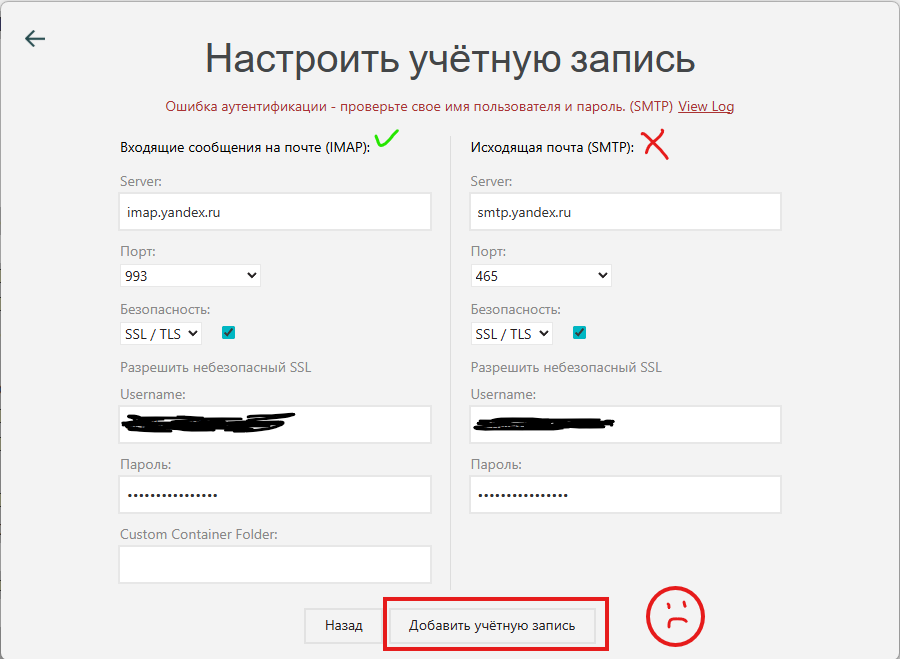
I have very similar problem. Can not authenticate to SMTP with TLS with correct password. IMAP does work correctly. But because of SMTP error I can’t complete account configuration setup. I just tested my password manually with openssl s_client:

C:\Users\alex>openssl s_client -connect smtp.yandex.ru:465 -crlf
Connecting to 77.88.21.158
CONNECTED(0000011C)
...
    00b0 - 4f 18 a0 74 20 3c 54 ec-f2 cf 4a f3 dc fd e1 1f   O..t <T...J.....

    Start Time: 1769762860
    Timeout   : 7200 (sec)
    Verify return code: 0 (ok)
    Extended master secret: no
    Max Early Data: 0
---
read R BLOCK
220 mail-nwsmtp-smtp-production-main-57.sas.yp-c.yandex.net Ok 1769762862-glfFuHJG34Y0
EHLO OPTIMUS
250-mail-nwsmtp-smtp-production-main-57.sas.yp-c.yandex.net
250-8BITMIME
250-PIPELINING
250-SIZE 53477376
250-STARTTLS
250-AUTH LOGIN PLAIN XOAUTH2
250-DSN
250 ENHANCEDSTATUSCODES
AUTH LOGIN
334 VXNlcm5hbWU6
*************BASE64-username*************
334 UGFzc3dvcmQ6
*************BASE64-password*************
235 2.7.0 Authentication successful. 1769762920-glfFuHJG34Y0

And below is an error log from Mailspring:

----------IMAP----------
connect <mailcore::IMAPSession:009DF3E0>
* OK Yandex IMAP4rev1 at mail-imap-production-main-675.klg.yp-c.yandex.net:993 ready to talk with ::ffff:185.84.41.35:64995, 2026-Jan-30 11:52:38, cqfGmZ0j9uQ0
TLS ssl connect imap.yandex.ru 993 2
1 CAPABILITY
* CAPABILITY IMAP4rev1 CHILDREN UNSELECT LITERAL+ NAMESPACE XLIST UIDPLUS ENABLE ID AUTH=PLAIN AUTH=XOAUTH2 IDLE MOVE
1 OK CAPABILITY Completed.
connect ok
login
2 LOGIN ********* *********
* CAPABILITY IMAP4rev1 CHILDREN UNSELECT LITERAL+ NAMESPACE XLIST UIDPLUS ENABLE ID IDLE MOVE
2 OK LOGIN Completed.
3 NAMESPACE
* NAMESPACE (("" "|")) NIL NIL
3 OK NAMESPACE Completed.
login ok
4 XLIST "" "*"
* XLIST (\HasNoChildren \Unmarked \Sent \Sent) "|" "&BB4EQgQ,BEAEMAQyBDsENQQ9BD0ESwQ1-"
* XLIST (\HasNoChildren \Unmarked) "|" "&BBAEPQRP-"
* XLIST (\HasNoChildren \Unmarked) "|" "&BBAEQARFBDgEMg-"
* XLIST (\HasNoChildren \Unmarked) "|" "&BBgEQQRFBD4ENARPBEkEOAQ1-"
* XLIST (\HasNoChildren \Unmarked \Junk \Spam) "|" "&BCEEPwQwBDw-"
* XLIST (\HasNoChildren \Unmarked \Trash \Trash) "|" "&BCMENAQwBDsENQQ9BD0ESwQ1-"
* XLIST (\HasChildren \Unmarked) "|" "&BCQEOAQ7BEwEQgRABD4EMgQwBD0EPg-"
* XLIST (\HasNoChildren \Unmarked) "|" "&BCQEOAQ7BEwEQgRABD4EMgQwBD0EPg-|&BBMEPgRBBEMEQQQ7BEMEMwQ4-"
* XLIST (\HasNoChildren \Unmarked) "|" "&BCQEOAQ7BEwEQgRABD4EMgQwBD0EPg-|&BD0ENQQyBDAENgQ9BD4-"
* XLIST (\HasChildren \Unmarked \Drafts \Drafts) "|" "&BCcENQRABD0EPgQyBDgEOgQ4-"
* XLIST (\HasNoChildren \Unmarked \Templates) "|" "&BCcENQRABD0EPgQyBDgEOgQ4-|template"
* XLIST (\HasNoChildren \Unmarked \NoInferiors \Inbox) "|" INBOX
* XLIST (\HasChildren \Unmarked) "|" Mailspring
* XLIST (\HasNoChildren \Unmarked) "|" "Mailspring|Snoozed"
* XLIST (\HasChildren \Unmarked) "|" unis
* XLIST (\HasNoChildren \Unmarked) "|" "unis|archive"
* XLIST (\HasNoChildren \Unmarked) "|" "unis|private"
4 OK XLIST Completed.


----------SMTP----------
220 mail-nwsmtp-smtp-production-main-73.sas.yp-c.yandex.net Ok 1769763158-cqfnBEJG34Y0
init
EHLO OPTIMUS
250-mail-nwsmtp-smtp-production-main-73.sas.yp-c.yandex.net
250-8BITMIME
250-PIPELINING
250-SIZE 53477376
250-STARTTLS
250-AUTH LOGIN PLAIN XOAUTH2
250-DSN
250 ENHANCEDSTATUSCODES


SASL_PATH: 

SMTP Last Response Code: 250
SMTP Last Response: mail-nwsmtp-smtp-production-main-73.sas.yp-c.yandex.net
8BITMIME
PIPELINING
SIZE 53477376
STARTTLS
AUTH LOGIN PLAIN XOAUTH2
DSN
ENHANCEDSTATUSCODES


mailsmtp Last Error Code: 296
mailsmtp Last Error Explanation: Unknown
mailsmtp Last Error Location: 10
mailsmtp Last Auth Type: 2

Update.exe is in C:\Users\user\AppData\Local\Mailspring\app-1.16.0 in my case. Whenever this bug is solved you will be able download the new MailSpring version and installation will create a new folder like app-1.18.0 with a new update.exe so that the update process is restored.
1 Like

I can not believe it is taking soo long for this serious bug to be fixed.

1 Like