The Problem
In Apple Mail, there’s a neat and very useful feature: A small toggle icon to filter the mail list by unread. Currently, I find it difficult to get an overview over which emails are unread across and for each account.
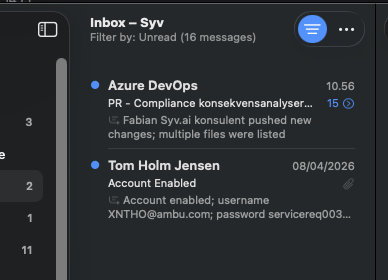
Notice the activated blue marker in the top-right corner.
Proposed Solution
As above.
Alternative Solutions
Context
If I go to any account or just consolidated inbox, I cannot easily surface unread emails. I have to go into the “unread” folder for each account - and these “unread” folders do not show a badge for unread emails, which I am not sure qualifies as a bug.
To clarify further, the ideal scenario for me is
- Having the all/unread toggle button
- Having the ability to separate by account entirely.
For point 2, this is the view I have in Apple Mail:
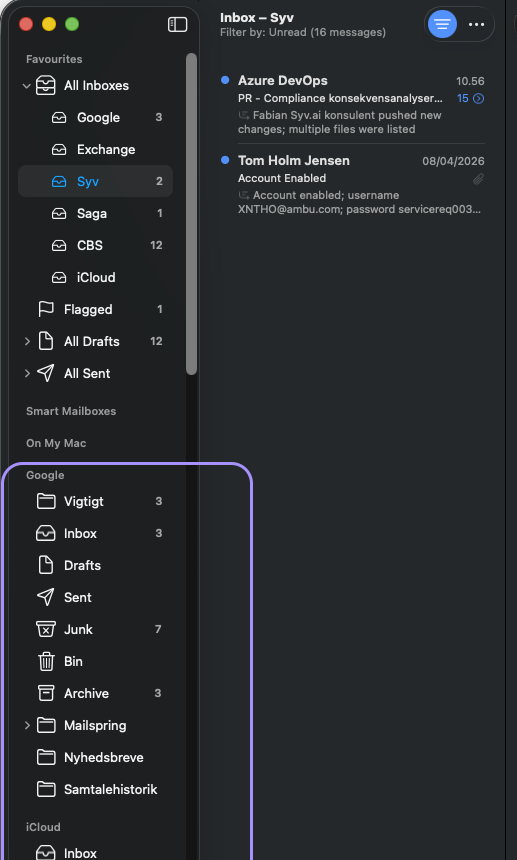
Notice how I have a full section for each account.
In contrast, in Mailspring, I have there is just one section that consolidates all, with subfolders for each account (and I can’t find a way to change to the “Apple Mail” view).
I realize that these a separate issues but in terms of seeing unread emails for each account they are highly related.