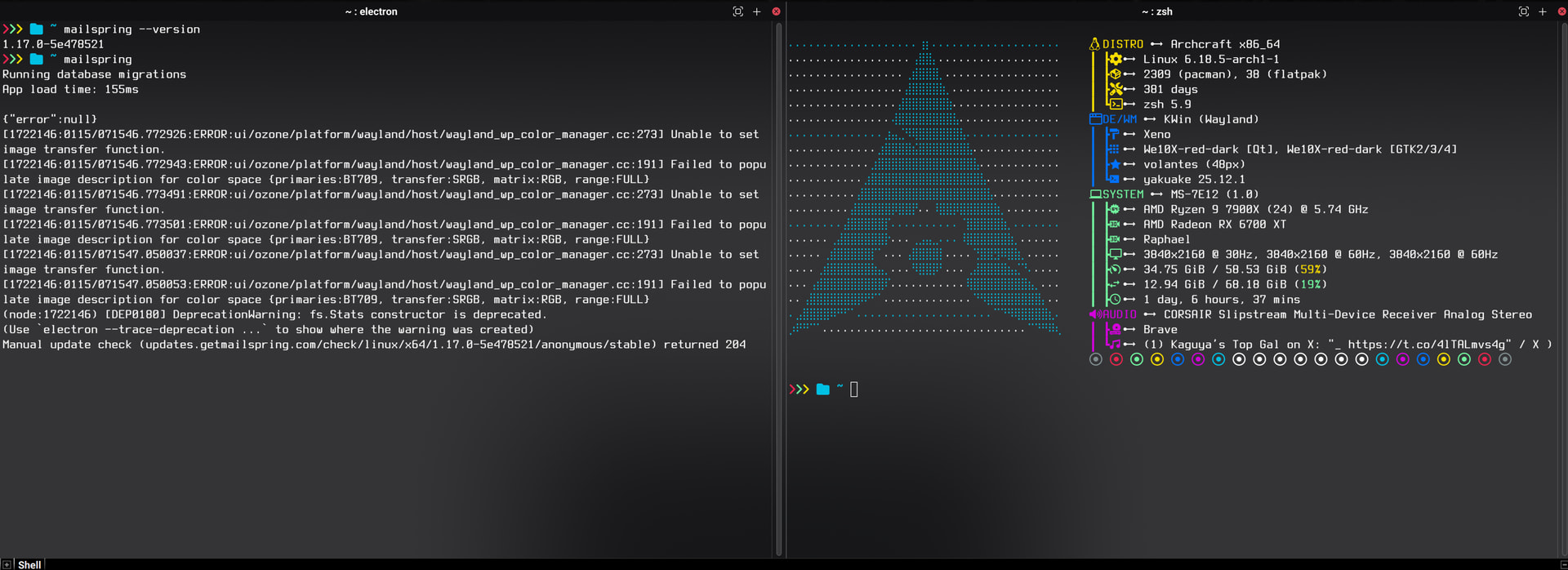
I have successfully used Mailspring for over a year and various version updates on this system. After the recent update to v1.17 which preports to have new Wayland support, my Mailspring will execute, and I get the icon in my system tray, but the application window itself refuses to show. I tried running it from the terminal to see what was breaking. Below are the errors I get. They have to do with Wayland color profiles, I believe. I later ran the app with “–ozone-platform=x11” to force the app to use X11 and it opened and worked fine like that. Though native Wayland support would be great, so I look forward to this being fixed. Great work, Mailspring team! Love the application.
To Reproduce…
Steps to reproduce the behavior:
Have the new V1.17 on a system with native wayland.
Run the applicaiton from command line and see the errors.
Expected Behavior
The application should open without forcing X11
Setup
Below are my systems specs, OS versions, and Mailspring version all from the terminal so you know they are exact and correct. I install the package mailspring-bin from the AUR.
This happens to me as well on openSUSE Tumbleweed. I have to launch it with --ozone-platform=x11 the first time, after that it works without this flag.
It happens to me as well on Ubuntu 24.04.3 clean install. I have to launch it with --ozone-platform=x11 the first time, after that it works without this flag too.
As others, –ozone-platform=x11 worked from terminal on Ubuntu 22.04. However, unlike others have commented, it did not continue to work when clicking desktop icon on second or more attempts.
Running sudo snap revert mailspring in terminal reverted to 1.16.0 which works for me until issue is resolved.
I can confirm this issue on KDE Plasma (Wayland) as well.
After upgrading from Mailspring 1.16.0 → 1.17.0 on Kubuntu, the app becomes unstable under a Wayland session. It launches and runs migrations, but produces Wayland-related errors and does not behave correctly. Downgrading back to 1.16.0 immediately restores stability.
Relevant error output on exit:
ERROR:ui/events/platform/wayland/wayland_event_watcher.cc:47
libwayland: warning: queue destroyed while proxies still attached
  zwp_tablet_pad_group_v2 still attached
  zwp_tablet_pad_v2 still attached
Environment:
OS: Kubuntu 25.10 (Questing Quokka)
Kernel: 6.17.0-8-generic
Desktop: KDE Plasma 6.4.5
Session: Wayland (KWin)
GPU: AMD Ryzen 7 5700U (integrated AMD GPU)
Happy to provide additional logs or test fixes if helpful. Thanks for the continued work on Mailspring! The deb package version has been rock solid prior to 1.17.0.
Hey folks, thanks for all the detailed reports and I’m sorry that the 1.17 update has introduced instability. I’m trying to figure out our best path forward here.
In September, the Electron 38.2 release moved to Wayland by default, following a change in Chromium. There have been Github issues accusing them of moving over to it too quickly (and it seems that may have been true…), but it seems like we’ll need to figure out how to support Wayland in order to continue moving forward with new versions of Electron.
It sounds like there are several different things going on here:
X11 fallback causing 100% CPU Usage
App getting through setup, but then not showing the main window under Wayland
I’m also curious to understand the scope of the problem - it seems like this is happening across a range of Linux distros, but maybe some users on Ubuntu 24 are not seeing issues and this is GPU / system dependent in some other way? I personally run into issue #2 above and have to use the –ozone-platform=x11 flag when I run Ubuntu 24 in a VM, but I think it’s because the VM doesn’t offer GPU acceleration at all.
Same for me on Ubuntu 25.10. However, running the app once with the –ozone-platform=x11 flag is not enough: every time I launch mailspring I must tell it to use x11
Well yes, if your running it in a VM and using xRDP or vnc, Wayland isn’t going to be supported. Though I’m having similar issues to other people on this thread with the Snap and Ubuntu 24.04.3 LTS with Intel integrated graphics. Main window doesn’t show up. But it does work if I use the --ozone-platform=x11 switch. Haven’t tried installing the deb file directly.
Update: Tried installing the DEB directly, same issue with Wayland sadly. It actually crashes with the error, mailsync.bin assert failure: malloc_consolidate(): unaligned fastbin chunk detected
Confirmed on (K)Ubuntu 25.10 on 2 different machines (fully updated software). 1.6.0 worked, after upgrade no window, only the icon next to the clock. Tried with .deb and snap. Even removed all electron cache. Oddly enough, a brand new install (no config at all) does show a screen, but I couldn’t continue (the Google authentication didn’t come through). Workaround is making a .desktop file in ~/.local/share/applications/mailspring_mailspring.desktop and adding the --ozone-platform=x11 line after the Exec.
For reference, here’s the output on the terminal:
$ mailspring Gtk-Message: 19:28:06.704: Not loading module "atk-bridge": The functionality is provided by GTK natively. Please try to not load it.
(mailspring:19028): Gtk-WARNING**: 19:28:06.820: Theme parsing error: gtk.css:1:21: Failed to import: Error opening file /home/bart/snap/mailspring/566/.config/gtk-3.0/colors.css: No such file or directory Running database migrations App load time: 386ms
{"error":null} (node:19028) [DEP0180] DeprecationWarning: fs.Stats constructor is deprecated. (Use `mailspring --trace-deprecation ...` to show where the warning was created) (node:19200) [DEP0180] DeprecationWarning: fs.Stats constructor is deprecated. (Use `exe --trace-deprecation ...` to show where the warning was created) (node:19201) [DEP0180] DeprecationWarning: fs.Stats constructor is deprecated. (Use `exe --trace-deprecation ...` to show where the warning was created)
One addition, it apparently thinks it’s not the default mailprogram after an upgrade using snap from 1.6 to 1.7.1. After clicking on yes, it’s okay again. But perhaps this gives a clue or so?
I think this is related to the tray icon. If I disable the tray icon in settings then Mailspring starts just fine as a Wayland window. It looks like the code already uses StatusNotifierItem so I’m not sure what’s going on there. Perhaps the logic to create windows off the running tray process isn’t passing the wayland socket or something?
OK I messed around with a bit more and I think the culprit might actually be the feature of launching in the background.
The following is able to reliably reproduce the issue on my machine:
Launch mailspring with mailspring –background
CTRL+C to kill it, and run ps to ensure that all processes are stopped
At this point there are no mailspring/mailsync processes running however running mailspring (without background flag) will result in the window not showing up. The tray icon will if you have that enabled but you won’t be able to show the window with “Show inbox”. This is the behavior that everyone else in this thread is experiencing.
Now if you run mailspring –ozone-platform=x11 then the mailspring window will appear immediately. If you close out of the window/kill mailspring at this point then all subsequent launches of mailspring (without the --ozone-platform=x11 flag) will succeed and mailspring will launch correctly. At this point it is running as a Wayland window and everything seems to work, and you can continue to close and start mailspring in this way so long as mailspring –background is not called.
So clearly there seems to be something caused by --background that seems to persist beyond the process end, and this seems to be what is breaking launching Wayland windows. I’m not sure what that is though (DBUS?) but hopefully this gives @bengotow enough information to track it down.
So TLDR for anyone having this issue, start mailspring as an x11 window and then disable “Launch on System Start”. That should make it work without the x11 flag if you log out and back in.
Having the same issue on Pop!_OS 24.04 with Cosmic DE. I tried launching with the –ozone-platform=x11flag but it still doesn’t spawn a window. I see the tray icon but no application window.
Beware that you must use a normal dash in front of the flag. You and others above posted a flag version that does not work. If you copy-pasted the flag from above it might insert a wrong dash character:
mailspring –ozone-platform=x11 incorrect and not working
mailspring -ozone-platform=x11 correct and working
mailspring --ozone-platform=x11 correct and working
The insertion of the wrong dash character in this forum happens because -- in markdown is rendered as –. This is a rendered double dash (--): –
To prevent this from happening make sure to always encase your commands and code with “`”. In the editor bar this is called “Preformatted text”. (Also @saraicomputing )
Ah damn you’re right, I didn’t even notice the wrong dash. I’m able to get a window to spawn with the correct flag. I tried updating my .desktop file with the flag but that seems to launch in the background still when clicking the app from my launch bar.
Not sure how it works under Pop!_OS but maybe that helps.
On Ubuntu 25.10 I have two .desktop files. One for the launcher to start in the foreground and one to enable autostart of mailspring in the background. The updated content of the .desktop file for the launcher at /usr/share/applications/Mailspring.desktop should include:
Exec=mailspring -ozone-platform=x11 %U
While the file for autostart under ~/.config/autostart/Mailspring.desktop should include